AWS Secrets Management: Secrets Manager vs Parameter Store
A practical guide to choosing between AWS Secrets Manager and SSM Parameter Store for storing credentials, API keys, and config values in production systems.
Secrets in .env files, hardcoded in application code, or stored as plaintext in configuration repositories. This is where most security incidents start. I find this pattern in almost every codebase I audit.
AWS provides two services for secrets management: SSM Parameter Store and Secrets Manager. Most developers know one or the other but not when to use each. This guide covers both, the real tradeoffs, and the correct patterns for integrating them with ECS and Lambda.
This is directly related to the Terraform patterns I covered in Terraform lessons from production projects where secrets management via SSM is covered briefly. This article goes deeper.
Why Not Environment Variables
The obvious question first. Environment variables seem convenient. Why not just set DATABASE_PASSWORD in your ECS task definition or Lambda environment?
Three reasons:
Plaintext in task definitions. ECS task definitions are stored in plaintext in AWS. Anyone with ecs:DescribeTaskDefinition permissions can read all environment variable values. That is a broad permission that many developers have.
Audit trail gaps. When a task definition stores a secret directly, there is no audit trail for who read that secret value. With Parameter Store or Secrets Manager, every read is a CloudTrail event.
No rotation path. Changing a secret stored as an environment variable requires updating the task definition and redeploying. With a secrets store, you update the secret value and the next container start picks it up automatically.
SSM Parameter Store
Parameter Store is a key-value store for configuration and secrets. It has two tiers: Standard and Advanced.
Standard parameters:
- Up to 4 KB per value
- Free for up to 10,000 parameters
- SecureString type uses KMS encryption at rest
Advanced parameters:
- Up to 8 KB per value
- 0.05 USD per parameter per month
- Supports parameter policies for expiration and notification
For most use cases, Standard parameters are sufficient.
Parameter Types
Parameter Store has three types:
| Type | Use For | Encrypted |
|---|---|---|
| String | Non-sensitive config like feature flags, URLs | No |
| StringList | Comma-separated values | No |
| SecureString | Credentials, API keys, tokens | Yes, via KMS |
Always use SecureString for anything sensitive. The encryption is transparent and uses your AWS KMS key.
Naming Convention
Use a hierarchical path that organizes parameters by application and environment:
/myapp/production/database/url
/myapp/production/database/password
/myapp/production/redis/url
/myapp/production/external-api/key
/myapp/staging/database/url
/myapp/staging/database/password
This makes IAM policies easy to write. A production task role needs access to /myapp/production/*. A developer needs access to /myapp/staging/*. No overlap.
Creating Parameters
Via AWS CLI:
# Non-sensitive config (String type)
aws ssm put-parameter \
  --name "/myapp/production/app/port" \
  --value "8080" \
  --type "String"

# Sensitive value (SecureString type)
aws ssm put-parameter \
  --name "/myapp/production/database/password" \
  --value "your-actual-password" \
  --type "SecureString" \
  --key-id "alias/aws/ssm"  # Use default KMS key or your own
Via Terraform (for non-sensitive config only):
resource "aws_ssm_parameter" "app_port" {
  name  = "/myapp/production/app/port"
  type  = "String"
  value = "8080"
}

# For secrets: create the parameter but ignore value changes
# Set actual value via CLI, never in code
resource "aws_ssm_parameter" "db_password" {
  name  = "/myapp/production/database/password"
  type  = "SecureString"
  value = "PLACEHOLDER"  # Immediately overwritten via CLI

  lifecycle {
    ignore_changes = [value]
  }
}
The ignore_changes = [value] lifecycle block is critical. Terraform creates the parameter but never reads or overwrites the value. You set the real secret via CLI. This way, secrets never appear in Terraform state files.
Reading Parameters in Application Code
Go example reading from Parameter Store at startup:
package config

import (
    "context"
    "fmt"

    "github.com/aws/aws-sdk-go-v2/aws"
    "github.com/aws/aws-sdk-go-v2/config"
    "github.com/aws/aws-sdk-go-v2/service/ssm"
)

func LoadSecretsFromSSM(ctx context.Context, appEnv string) (*Secrets, error) {
    cfg, err := config.LoadDefaultConfig(ctx)
    if err != nil {
        return nil, fmt.Errorf("loading AWS config: %w", err)
    }

    client := ssm.NewFromConfig(cfg)

    // Fetch multiple parameters in one API call
    result, err := client.GetParameters(ctx, &ssm.GetParametersInput{
        Names: []string{
            fmt.Sprintf("/myapp/%s/database/password", appEnv),
            fmt.Sprintf("/myapp/%s/external-api/key", appEnv),
        },
        WithDecryption: aws.Bool(true),
    })
    if err != nil {
        return nil, fmt.Errorf("fetching parameters: %w", err)
    }

    secrets := &Secrets{}
    for _, param := range result.Parameters {
        switch aws.ToString(param.Name) {
        case fmt.Sprintf("/myapp/%s/database/password", appEnv):
            secrets.DBPassword = aws.ToString(param.Value)
        case fmt.Sprintf("/myapp/%s/external-api/key", appEnv):
            secrets.ExternalAPIKey = aws.ToString(param.Value)
        }
    }

    return secrets, nil
}
ECS Integration: Secrets in Task Definitions
The better pattern for ECS: reference parameters directly in the task definition. ECS fetches the values and injects them as environment variables when the container starts. Your application code does not need any SSM SDK.
resource "aws_ecs_task_definition" "api" {
  family                   = "my-api"
  requires_compatibilities = ["FARGATE"]
  network_mode             = "awsvpc"
  cpu                      = 256
  memory                   = 512
  execution_role_arn       = aws_iam_role.ecs_execution.arn
  task_role_arn            = aws_iam_role.ecs_task.arn

  container_definitions = jsonencode([{
    name  = "api"
    image = "123456789012.dkr.ecr.ap-southeast-1.amazonaws.com/my-api:latest"

    environment = [
      # Non-sensitive config as plain environment variables
      { name = "APP_ENV", value = "production" },
      { name = "PORT", value = "8080" }
    ]

    secrets = [
      # Sensitive values injected from SSM
      {
        name      = "DATABASE_PASSWORD"
        valueFrom = "arn:aws:ssm:ap-southeast-1:123456789012:parameter/myapp/production/database/password"
      },
      {
        name      = "EXTERNAL_API_KEY"
        valueFrom = "arn:aws:ssm:ap-southeast-1:123456789012:parameter/myapp/production/external-api/key"
      }
    ]
  }])
}
The execution role needs permission to read these parameters:
resource "aws_iam_role_policy" "ecs_execution_ssm" {
  name = "ssm-read"
  role = aws_iam_role.ecs_execution.id

  policy = jsonencode({
    Version = "2012-10-17"
    Statement = [{
      Effect = "Allow"
      Action = [
        "ssm:GetParameters",
        "ssm:GetParameter"
      ]
      Resource = "arn:aws:ssm:ap-southeast-1:123456789012:parameter/myapp/production/*"
    }]
  })
}
Your application sees DATABASE_PASSWORD as a normal environment variable. No SDK, no API calls, no latency at request time.
AWS Secrets Manager
Secrets Manager is designed for secrets that require automatic rotation. The key differentiator versus Parameter Store is the built-in rotation engine backed by Lambda functions.
When to Use Secrets Manager
Use Secrets Manager when you need:
- Automatic rotation for database passwords, API keys, or certificates
- Cross-account access to share secrets between AWS accounts
- Fine-grained access policies on individual secrets
- Secret versioning with the ability to retrieve previous versions during rotation
For everything else, Parameter Store is simpler and cheaper.
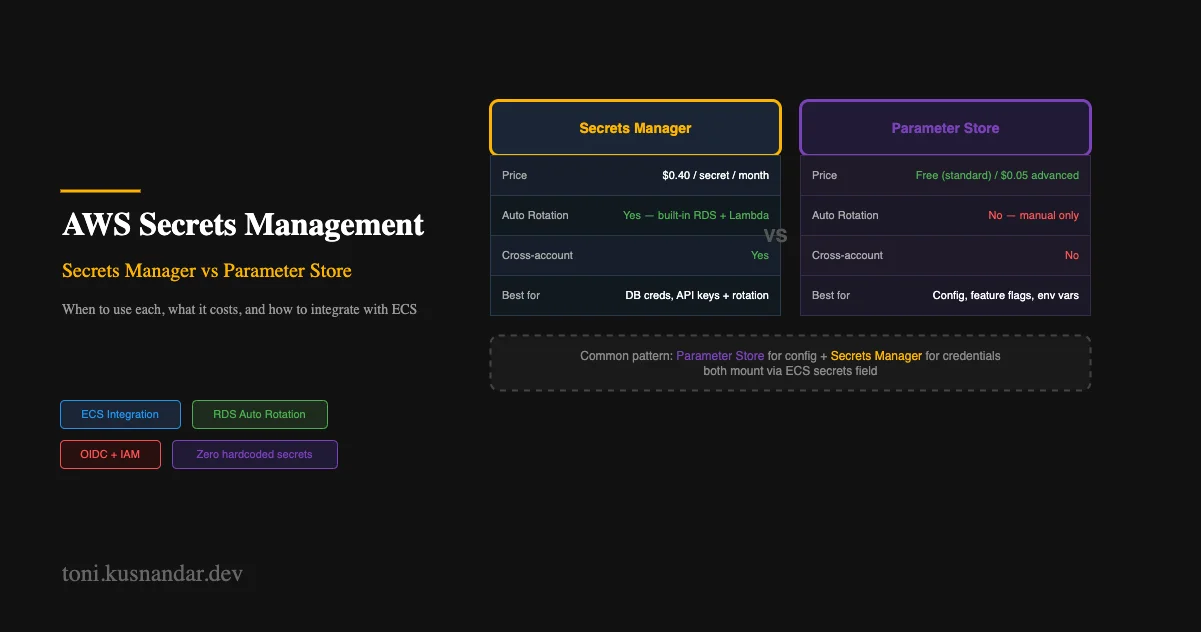
Cost Comparison
| Parameter Store | Secrets Manager | |
|---|---|---|
| Cost per secret/month | Free (standard) | 0.40 USD |
| API calls | 0.05 USD per 10,000 | 0.05 USD per 10,000 |
| 50 secrets | Free | 20 USD/month |
| Rotation | Manual | Automatic |
| Max size | 4 KB | 65 KB |
For a startup with 50 secrets, Secrets Manager costs 20 USD per month versus essentially free for Parameter Store. That gap matters when you are watching every dollar.
Creating a Secret
aws secretsmanager create-secret \
  --name "myapp/production/database" \
  --description "Production database credentials" \
  --secret-string '{"username":"dbadmin","password":"initial-password","host":"mydb.cluster.ap-southeast-1.rds.amazonaws.com","port":"5432","dbname":"myapp"}'
Secrets Manager stores JSON blobs, not just strings. This lets you group related credentials as a single secret.
Automatic Rotation for RDS
Secrets Manager integrates with RDS for automatic password rotation:
resource "aws_secretsmanager_secret" "db_credentials" {
  name                    = "myapp/production/database"
  recovery_window_in_days = 7
}

resource "aws_secretsmanager_secret_rotation" "db_rotation" {
  secret_id           = aws_secretsmanager_secret.db_credentials.id
  rotation_lambda_arn = aws_lambda_function.rotation.arn

  rotation_rules {
    automatically_after_days = 30
  }
}
AWS provides pre-built Lambda rotation functions for RDS MySQL, PostgreSQL, and Aurora. Deploy the rotation function from the AWS Serverless Application Repository, point Secrets Manager to it, and rotation runs automatically.
Your application must read the secret on each request or cache it with a short TTL to pick up rotated credentials:
func (r *DB) getPassword(ctx context.Context) (string, error) {
    // Cache for 5 minutes to reduce API calls
    if r.cachedPassword != "" && time.Since(r.cacheTime) < 5*time.Minute {
        return r.cachedPassword, nil
    }

    result, err := r.secretsClient.GetSecretValue(ctx, &secretsmanager.GetSecretValueInput{
        SecretId: aws.String("myapp/production/database"),
    })
    if err != nil {
        return "", err
    }

    var creds struct {
        Password string `json:"password"`
    }
    json.Unmarshal([]byte(aws.ToString(result.SecretString)), &creds)

    r.cachedPassword = creds.Password
    r.cacheTime = time.Now()
    return creds.Password, nil
}
ECS Integration
Same pattern as Parameter Store but with Secrets Manager ARNs:
secrets = [
  {
    name      = "DATABASE_PASSWORD"
    valueFrom = "arn:aws:secretsmanager:ap-southeast-1:123456789012:secret:myapp/production/database:password::"
  }
]
The :: at the end means ECS extracts the password key from the JSON blob. The execution role needs secretsmanager:GetSecretValue permission instead of SSM permissions.
Decision Framework
Need automatic rotation?
  YES → Secrets Manager
  NO  → Continue below

Need cross-account access?
  YES → Secrets Manager
  NO  → Continue below

Is this a credential or a sensitive config value?
  Credential (password, token, key) → Parameter Store SecureString
  Config (URL, flag, numeric value)  → Parameter Store String
For most small to mid-sized teams:
- Parameter Store SecureString for 90 percent of secrets: database passwords, API keys, tokens
- Secrets Manager only for database credentials where automatic rotation is required
This costs almost nothing and provides a solid security baseline. You can migrate specific secrets to Secrets Manager later when rotation becomes a priority.
Migration from Plaintext
If you are currently storing secrets as plaintext environment variables in task definitions or committed to Git, here is the migration path.
Before diving in: if you are not yet familiar with why environment variables matter or how .env files work, Environment Variables: The Thing Nobody Teaches covers the foundational concepts, the progression from hardcoded values to .env files to production secrets managers, before you tackle the AWS-specific tooling here.
- Create the parameter in SSM for each secret
- Update the task definition to use
secretsinstead ofenvironmentfor sensitive values - Grant the execution role permission to read those parameters
- Deploy the updated task definition
- Verify the application reads secrets correctly
- Remove plaintext values from the old configuration
The migration takes a few hours. The risk window is during step 4-5 where you need to verify the new configuration works before fully removing the old one. I recommend deploying to staging first with the full migration, running smoke tests, then promoting to production.
If you need help designing a secrets management strategy for your infrastructure, I offer DevOps support that covers IAM design, secrets migration, and ECS configuration. This is a common part of the DevOps setup for small teams where secrets management is often the first security improvement to make.
For real-world examples of this pattern in production systems, see insurance platform DevOps where SSM integration is used across all ECS services.