Environment Variables: The Thing Nobody Teaches
Why hardcoding config is a disaster, what environment variables actually are, and how the industry evolved from .env files to secrets managers. Learned the hard way.
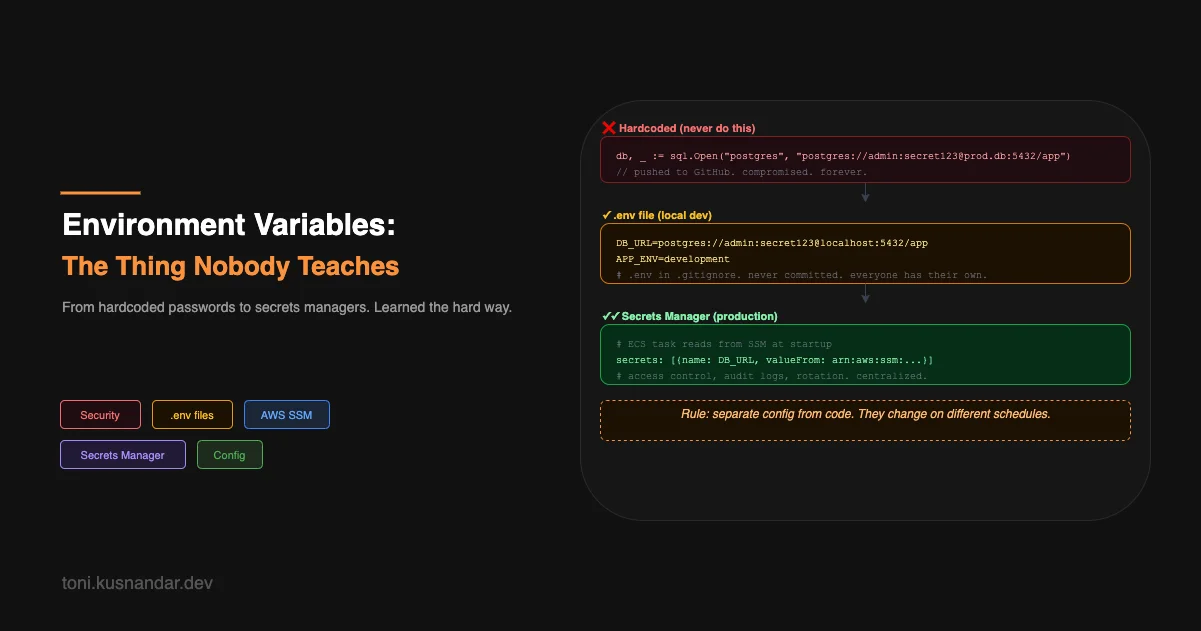
My second week writing code professionally, I pushed a Go app to a public GitHub repo with the database password hardcoded in a config file.
I did not realize what I had done for three days. By then, some automated scanner had already found it. I got an email from GitHub saying a secret had been detected in my commit history.
Rotating the password was easy. The embarrassment lasted longer.
Environment variables were not something anyone had explicitly taught me. I knew they existed in some vague way. I did not know why they mattered, how to use them properly, or what the actual failure mode looked like. Now I do.
What Environment Variables Are
Your operating system maintains a set of key-value pairs that it passes to every process it starts. These are environment variables. When you open a terminal and type echo $HOME, you are reading an environment variable. When your shell knows where to find programs, that is $PATH, another environment variable.
When you start your application, it inherits all the environment variables from the process that launched it. In Go:
import "os"

dbURL := os.Getenv("DATABASE_URL")
port := os.Getenv("PORT")
In Node.js:
const dbURL = process.env.DATABASE_URL;
const port = process.env.PORT;
Your app reads config from the environment at startup. The values come from outside the code. The code never contains the actual secrets.
That is the whole concept. The rest is just tooling built on top of it.
Why Not Just Hardcode It
The obvious argument against hardcoding is security. Credentials in source code means anyone with access to the code has the credentials. That includes every developer, every contractor, every person who ever forks the repo. If the repo is public, it means everyone.
But even for private repos, hardcoding is a problem. Config changes on a different schedule than code. Your database password should rotate periodically. Your API keys change when you switch providers. Your staging environment uses a different database than production.
If config is in code, changing it means a code change: commit, PR, review, merge, deploy. That is a lot of process for what should be an operational concern. Environment variables let ops change config without touching code.
The practical version: you write the code once. You deploy it to three environments: development, staging, production. Each environment gets its own values for DATABASE_URL, REDIS_URL, LOG_LEVEL. Same binary. Different behavior. No code changes needed.
The .env File Pattern
Nobody types export DATABASE_URL=postgres://... by hand every time they start their app. The standard solution is a .env file.
# .env
DATABASE_URL=postgres://postgres:password@localhost:5432/myapp_dev
REDIS_URL=redis://localhost:6379
PORT=8080
JWT_SECRET=dev-secret-not-for-production
LOG_LEVEL=debug
A library (like godotenv for Go, or dotenv for Node) reads this file at startup and loads the variables into the process environment.
import "github.com/joho/godotenv"

func main() {
    // Load .env file if it exists (ignored in production where vars are set differently)
    godotenv.Load()

    dbURL := os.Getenv("DATABASE_URL")
    // ...
}
The critical rule: .env goes in .gitignore. Always.
# .gitignore
.env
.env.local
.env.production
What you commit instead is a .env.example with fake values showing what variables are needed:
# .env.example — safe to commit, documents what is required
DATABASE_URL=postgres://user:password@localhost:5432/dbname
REDIS_URL=redis://localhost:6379
PORT=8080
JWT_SECRET=change-this-to-a-real-secret
LOG_LEVEL=info
When a new developer joins, they copy .env.example to .env and fill in real local values. Simple, documented, no secrets in git.
Where It Gets Complicated
The .env pattern works well for local development. It starts to break at the edges.
Multiple servers. When your app runs on three VPS instances for load balancing, each instance needs the same environment variables. Do you SSH into each one and update .env files manually? What if you add a new variable?
Secrets rotation. Your database password needs to rotate every 90 days for compliance. With .env files on three servers, rotation means SSHing into each one, updating the file, and restarting the app. That is error-prone and not auditable.
Who has the production .env? At some point someone has a copy of the production credentials on their laptop. What happens when that person leaves? What happens if their laptop is stolen?
Onboarding. “Ask someone for the .env file” is not a sustainable answer. It means credentials are shared over Slack or email, stored in people’s Downloads folders, and impossible to track.
These are real problems. They are why secrets management tools exist.
Secrets Managers: The .env File Grows Up
A secrets manager is a central store for secrets with access control, versioning, and audit logs. Instead of a file on a server, your secrets live in a service. Your app fetches them at startup or on demand.
On AWS, the two main options are SSM Parameter Store (general-purpose, free tier, good for non-sensitive config) and Secrets Manager (purpose-built for credentials that need automatic rotation, costs $0.40/secret/month). I have written a detailed comparison of both, when to use each, how they integrate with ECS, and the migration path from plaintext env vars, in a separate article: AWS Secrets Management: Secrets Manager vs Parameter Store.
The short version for this article: in ECS and Lambda, you can define secrets in your task definition and the platform injects them as environment variables at container startup. Your app still reads os.Getenv("DATABASE_URL"). The sourcing happens transparently.
The Mental Model That Makes It Click
Separate config from code. That is the whole principle.
Code is what your application does. Config is how it behaves in a specific environment. They are different things. They change on different schedules. They should be managed by different people (developers change code, ops changes config).
| Concern | Changes When | Changed By |
|---|---|---|
| Code | Feature or bug fix | Developer |
| Config | Environment, rotation, tuning | Developer or Ops |
| Secrets | Rotation, breach, offboarding | Ops or Security |
Environment variables are the mechanism. .env files are the local developer experience. Secrets managers are the production-grade version. The underlying principle is the same across all three: the value lives outside the code.
The last thing I will say about secrets: once a secret is in your git history, it is compromised. Full stop. Deleting the file does not help. Squashing commits does not help reliably. The correct response is to rotate the credential immediately, assume it was seen, and move on. Git history is permanent and public repos get scraped within minutes of secrets appearing in them.
Ask me how I know.
The next thing that made everything click for me was Docker. Not because containers are magic, but because they forced me to think clearly about what my application actually needed to run, and that turned out to be a more interesting question than I expected.