What Docker Actually Solves
Docker is not about containers for their own sake. It solves a specific, painful problem: making your app run the same way everywhere. Here is the journey from 'works on my machine' to understanding why containers exist.
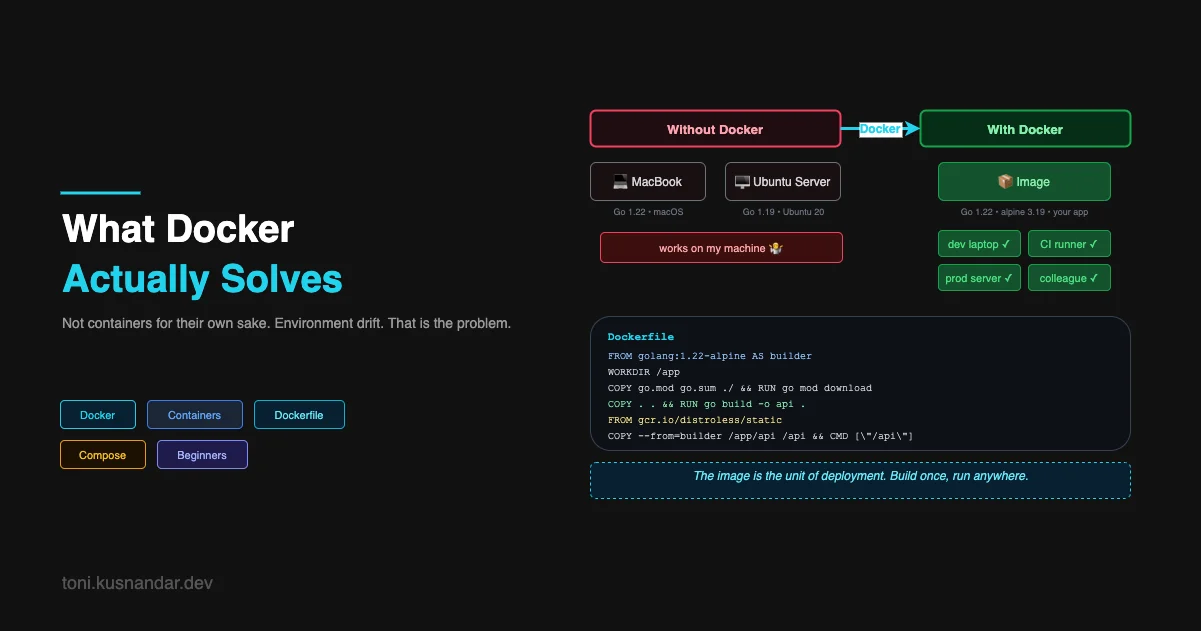
I installed Docker on my laptop, followed a tutorial, ran docker run hello-world, and completely failed to understand why anyone cared.
It printed a message. My Go binary also prints messages. What was the point?
The problem with most Docker tutorials is they start with the mechanics before establishing the problem. Here is the problem first.
The Environment Drift Problem
After a few months of the VPS workflow from Deploying Your First Backend API to a Real Server, I hit a pattern that started driving me crazy.
I would build my Go app locally, test it, copy the binary to the server, and something would break. Not always. Maybe 30% of the time. And the reasons were always different.
One time it was a system library for image processing that was installed on my Mac but not on the Ubuntu server. Another time it was a timezone database that behaved differently between OS versions. Another time a Node.js script I used as part of the build expected a specific version of Node that production did not have.
These bugs shared a property: they did not exist in my development environment. They only appeared when the code ran somewhere else. The combination of OS, installed packages, runtime versions, and system libraries was different on my laptop versus the server, and those differences occasionally mattered.
This is “works on my machine.” It is not a joke. It is a real category of bug that consumed hours of debugging time.
What Docker Is Actually Doing
A container is an isolated process. It has its own filesystem, its own network interface, and its own view of the system, but it shares the host’s kernel. It is lighter than a full virtual machine because there is no hardware emulation, but more isolated than a regular process because the environment is fully controlled.
The thing Docker provides on top of containers is a packaging format: the image.
An image is a snapshot of a filesystem. When you create a Docker image for your app, you define exactly what is in it: which Linux distribution, which system packages, which runtime version, which libraries, and your application code. You build this image once. You can run it anywhere Docker is installed and it will behave identically, because it brings its own environment with it.
The dependency that was missing on the server? It is in the image. The wrong Node version? The image has the right one baked in. Environment drift disappears because the environment travels with the code.
Writing Your First Dockerfile
A Dockerfile is a list of instructions for building an image. For a Go app:
# Start from the official Go image — this gives us the Go toolchain
FROM golang:1.22-alpine AS builder

WORKDIR /app

# Copy dependency files first — Docker caches layers
# If go.mod and go.sum do not change, this layer is cached
COPY go.mod go.sum ./
RUN go mod download

# Copy source code
COPY . .

# Build the binary
RUN CGO_ENABLED=0 GOOS=linux go build -o server ./cmd/api

# Second stage: tiny final image — no Go toolchain needed to run
FROM alpine:3.19

RUN apk add --no-cache ca-certificates tzdata

WORKDIR /app
COPY --from=builder /app/server .

EXPOSE 8080
CMD ["./server"]
A few things worth understanding here:
Multi-stage builds. The first stage (builder) has the Go toolchain and compiles the binary. The second stage starts fresh from a minimal Alpine image and copies only the compiled binary. The final image has no Go toolchain, no source code, no build tools. It is just your binary and the libraries it needs to run. This is why Go Docker images can be under 20MB.
Layer caching. Docker builds images layer by layer. If a layer has not changed since the last build, Docker reuses the cached version. Copying go.mod and go.sum before your source code means dependency downloads are cached as long as your dependencies do not change, even if your source code does. A cache-conscious Dockerfile builds in seconds instead of minutes.
This example covers the fundamentals. Once you are comfortable with this pattern, the next level is optimizing image size further and integrating builds with CI/CD, I cover both in detail in Docker Multi-Stage Builds: Smaller Images, Faster Deploys, including Node.js and Java examples, BuildKit cache mounts, and security hardening.
Build the image:
docker build -t my-api:latest .Run it:
docker run -p 8080:8080 \
  -e DATABASE_URL=postgres://... \
  -e PORT=8080 \
  my-api:latest
The -p 8080:8080 maps port 8080 on your machine to port 8080 inside the container. The -e flags pass environment variables in. Your app runs exactly as it would on any other machine with Docker installed.
Docker Compose: Your Whole Stack in One File
Your API does not run alone. It needs a database. Probably a Redis cache. Maybe a message queue. Running each of these manually gets tedious fast.
Docker Compose defines your entire development stack in one YAML file and starts everything with one command:
# docker-compose.yml
services:
  api:
    build: .
    ports:
      - "8080:8080"
    environment:
      - DATABASE_URL=postgres://postgres:postgres@db:5432/myapp
      - REDIS_URL=redis://cache:6379
    depends_on:
      db:
        condition: service_healthy
      cache:
        condition: service_started
    develop:
      watch:
        - action: rebuild
          path: .

  db:
    image: postgres:16-alpine
    environment:
      POSTGRES_DB: myapp
      POSTGRES_USER: postgres
      POSTGRES_PASSWORD: postgres
    ports:
      - "5432:5432"
    volumes:
      - pgdata:/var/lib/postgresql/data
    healthcheck:
      test: ["CMD-SHELL", "pg_isready -U postgres"]
      interval: 5s
      timeout: 5s
      retries: 5

  cache:
    image: redis:7-alpine
    ports:
      - "6379:6379"

volumes:
  pgdata:
docker compose upOne command. All three services start. Your API waits for the database to be healthy before starting. Logs from all services stream to your terminal. Stop everything with Ctrl+C.
A new developer joins your team. They clone the repo, run docker compose up, and have a fully working local environment in under a minute. No “install Postgres” instructions, no version conflicts, no “it works on my machine.”
The Image Is the Unit of Deployment
This is the mental shift that made containers valuable to me.
Previously, my deployment unit was a binary. I built it on my laptop and copied it to the server. The binary had implicit dependencies on the environment it ran in.
With Docker, my deployment unit is an image. I build it, push it to a registry, and pull it to run anywhere:
# Build and tag
docker build -t my-api:v1.2.3 .

# Push to AWS ECR
docker push 123456789.dkr.ecr.us-east-1.amazonaws.com/my-api:v1.2.3

# On any server with Docker
docker pull 123456789.dkr.ecr.us-east-1.amazonaws.com/my-api:v1.2.3
docker run -d my-api:v1.2.3
The image tag (v1.2.3) is immutable. That exact image, with that exact filesystem, runs identically on your laptop, on staging, and on production. No drift. No “but it worked in staging.”
Rollback becomes trivial. Broke production? Deploy the previous image tag.
# Something went wrong with v1.2.4
docker run -d my-api:v1.2.3  # back to previous version in seconds
What Docker Does Not Solve
It is worth being honest about the limits.
Docker solves the environment packaging problem. It does not solve the process management problem from article 4 (you still need something to keep containers running and restart them on crash), the secrets management problem from article 5 (environment variables still need to come from somewhere), or the scaling problem (running more containers when traffic increases).
Those are the problems that container orchestrators like ECS and Kubernetes solve. But you cannot understand why orchestrators exist without first understanding why containers exist. Environment isolation is the foundation. Orchestration is the next layer on top.
The last two pieces of the journey are the ones that close the loop on everything we have covered: CI/CD, which automates the build-and-deploy cycle so you stop doing it by hand, and the final step back to look at what “proper DevOps” actually means when you put it all together.