Deploying Frontend: The Hard Way, Then the Right Way
From dragging files into cPanel to S3 static hosting to CDN edge deployment. How frontend deployment evolved and what each stage actually taught me.
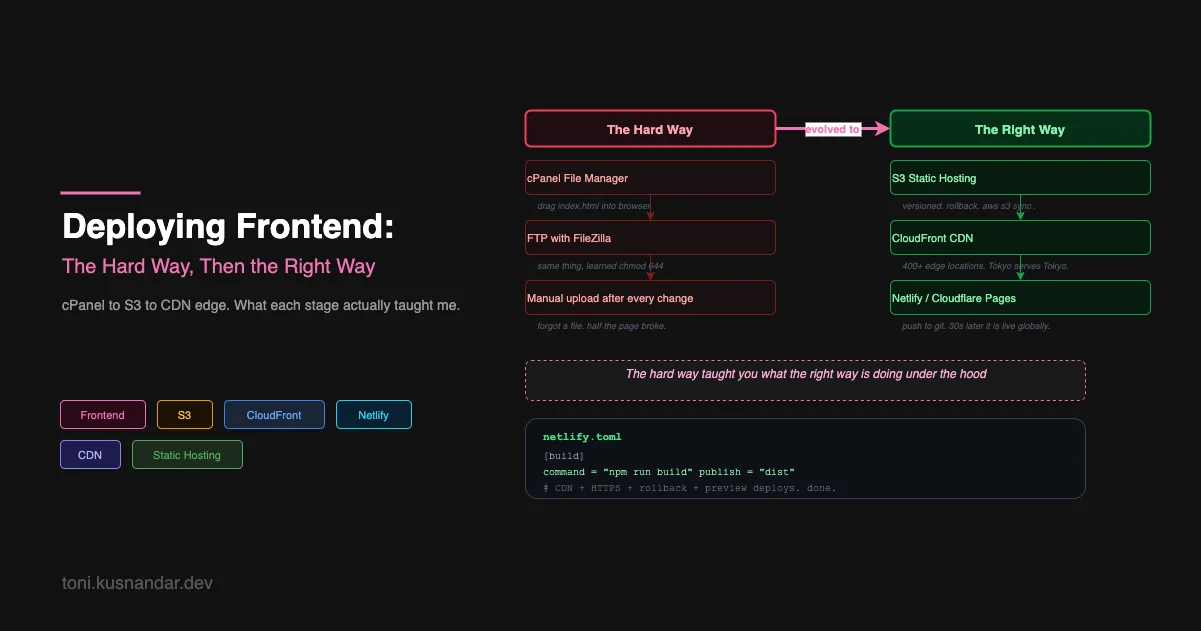
Frontend deployment has a funny arc. You start feeling embarrassed about how primitive your first approach was, then you realize everyone started the same way, and then you start appreciating each stage for what it taught you.
My first deployed website was a WordPress theme customization for a relative’s business. Deployment was clicking “Update” in the WordPress admin panel. I did not even realize that was deployment.
My second was a static HTML site I built myself. That one required actual effort.
The cPanel Era
Shared hosting was the default for a lot of developers who started in the early-to-mid 2010s. You paid a few dollars a month for a hosting account, you got a domain, and you got a control panel called cPanel.
To deploy, you went to cPanel, clicked File Manager, navigated to public_html, and dragged your files in. Your HTML, your CSS, your JavaScript, your images, all of it uploaded through a browser interface.
It worked. I am not being sarcastic. My site was on the internet, people could visit it, and the whole thing cost me $3/month.
What I did not understand yet: what was actually serving those files. The hosting company had Apache or Nginx running on their server. When someone requested my domain, Apache found the files in public_html and sent them. I owned the files. The server was someone else’s problem.
This is a genuinely useful mental model. Static files on a server. Someone requests a URL. The server sends the file. Nothing runs.
FTP: The Same Thing But With More Steps
When I started building slightly more complex sites, I graduated to FTP. FileZilla, mostly. You configure a connection with your host’s FTP credentials, browse your server’s filesystem on one side and your local filesystem on the other, and drag files between them.
The educational value of FTP was understanding file permissions. The frustrating moment when your PHP file executes correctly but your image does not load because the permissions are wrong. Learning what chmod 644 means. Learning why a web server needs read access to files but should not have write access.
# The annoying trio
chmod 755 directories   # rwxr-xr-x — owner can write, everyone can read/execute
chmod 644 files         # rw-r--r-- — owner can write, everyone can read
chmod 600 config files  # rw------- — only owner can read
I memorized these through pain, not through a tutorial.
The FTP workflow had a critical flaw: it was entirely manual. You made changes locally, you uploaded changed files, and you had to remember which files changed. One time I spent two hours debugging a production issue before realizing I had uploaded the wrong version of a JavaScript file. The old version was cached in my browser and the new version had not uploaded properly.
That incident made me think seriously about automation for the first time.
The Build Step Problem
Things got more complicated when I started using build tools. First it was LESS/Sass for CSS. Then webpack for JavaScript. Then React. Suddenly deployment was not just uploading files, I had to run a build first.
npm run build
# generates: dist/
#   index.html
#   assets/main.a3f8b2c1.js
#   assets/main.e9d2a1b3.css
The dist/ folder is what needed uploading, not my source files. And the filenames had content hashes now, so main.js became main.a3f8b2c1.js. Old cached versions would still work while users loaded the new ones.
This was good but it added a manual step: build locally, then upload dist/. Forget to build before uploading and you deploy old code. Build with the wrong environment variables and production gets dev config.
I needed something that could do this reliably without me being the weak link.
S3 Static Hosting
The first time I used S3 for static hosting I thought it was overkill. I was wrong. It is the right tool for this job and understanding why took me about a week of using it.
An S3 bucket with static website hosting enabled is just a file system that serves HTTP. You put files in, people request URLs, they get files back. Exactly like cPanel but with some major differences:
Versioning. Every upload is tracked. If you deploy broken code, you can restore the previous version. No more “I forgot to backup before deploying.”
CLI tooling. Instead of dragging files, you sync a local folder:
aws s3 sync ./dist s3://my-bucket --deleteThe --delete flag removes files in S3 that no longer exist locally. Your bucket always matches your build output exactly.
Programmatic access. Any script, any CI system, any automation can sync to S3 with the right IAM credentials. No browser required.
The deployment workflow became:
npm run build
aws s3 sync ./dist s3://my-bucket --delete
Two commands. Scriptable. Automatable. If build fails, nothing uploads.
CloudFront: Your Files, Everywhere
S3 is in one AWS region. If that region is us-east-1 and your users are in Singapore, every request crosses the Pacific. That is latency you are giving away for free.
CloudFront is a CDN. You put it in front of your S3 bucket and it caches your files at edge locations worldwide. AWS has 400+ edge locations. When a user in Singapore requests your app, they get it from an edge server in Singapore, not from Virginia.
User in Singapore
      ↓
CloudFront Edge (Singapore) ← cache hit → response in ~5ms
      ↓ (cache miss, first request)
CloudFront fetches from S3 (us-east-1)
      ↓
Stores in edge cache
      ↓ (all subsequent requests from Singapore)
Served from edge → ~5ms
The first time I set this up the performance difference was visible. Pages that took 800ms to load from another continent dropped to under 100ms.
There is one catch with CloudFront that burned me the first time: cache invalidation. You deploy new files to S3, but CloudFront is still serving cached old files. You need to explicitly invalidate the cache after each deploy:
aws s3 sync ./dist s3://my-bucket --delete
aws cloudfront create-invalidation \
  --distribution-id YOUR_DIST_ID \
  --paths "/*"
The content hashing in your build tool handles most of this automatically (different hash = different URL = no cache conflict), but index.html never gets a hash, so invalidating it explicitly after every deploy is important.
Modern Platforms: All of This Automated
Cloudflare Pages, Netlify, Vercel, these platforms exist to handle everything I just described automatically.
You connect your GitHub repo. You configure the build command and output directory. Every push to your main branch triggers: build → deploy to CDN → done. Pull requests get preview deployments at unique URLs.
# netlify.toml
[build]
  command = "npm run build"
  publish = "dist"

[[redirects]]
  from = "/*"
  to = "/index.html"
  status = 200
That is the entire configuration for a React SPA on Netlify. Infinite rollback, preview deployments, global CDN, automatic HTTPS, all included.
I use Cloudflare Pages for this blog. Every time I push to GitHub, the site deploys in about 45 seconds. I never think about servers or S3 or cache invalidation. The platform handles it.
What Each Stage Taught
Looking back, I am glad I went through the stages in order instead of jumping straight to Netlify:
cPanel/FTP: taught me what static file serving actually is, what file permissions mean, and how a web server maps URLs to files.
Manual S3 sync: taught me about programmatic deployment, IAM permissions, and what a CDN actually does.
S3 + CloudFront: taught me about edge caching, cache invalidation, and the actual infrastructure running under every modern frontend platform.
Modern platforms: let me stop thinking about this entirely and focus on the product.
The progression is real. If you understand what happens under Netlify’s hood, you can debug it when something goes wrong. If Netlify is all you know, mysterious failures stay mysterious.
Frontend deployment is the simpler half of the story though. The backend side introduces a whole new set of challenges: your code has to run, it has to stay running, and it has to connect to databases and services that also have to be running. That is the next article.