Your Laptop Is Already a Server
The moment I realized my localhost was accessible from my phone on the same WiFi. That one discovery changed how I thought about servers, ports, and deployment forever.
I was maybe two years into writing code when someone asked me a question I could not answer.
I had built a small web app, nothing fancy, just a todo list with a Go backend and a plain HTML frontend. A friend came over and wanted to see it. My instinct was to say “let me deploy it first.” He looked at me and said, “why can not you just open it now?”
I opened localhost:8080 on my laptop, it worked fine. But he was sitting across the table with his phone. And I had no idea how to get it to him without “deploying” it somewhere.
That moment exposed a gap in my understanding I did not know I had.
What I Thought Servers Were
Before that conversation, I had a vague mental model: servers were special computers somewhere in a data center. They were different from laptops. They ran Linux. They were expensive. You deployed your code to them and then the internet could see it.
My laptop was just for development. It ran code, sure, but it was not a server. That distinction felt obvious and I had never questioned it.
Turns out, that distinction is almost entirely fake.
What a Server Actually Is
A server is just a program waiting for incoming connections. That is it. HTTP server, database server, SSH server, they are all just processes listening on a port, waiting for someone to connect.
When you run npm run dev or go run . or python manage.py runserver, you are starting an HTTP server. Your laptop is now a server. It is sitting there, listening on port 3000 or 8080 or whatever you configured, waiting for a browser to connect.
The reason you type localhost is because that is a special hostname that means “this machine.” Port 8080 is just a number, a door on your machine. Your browser knocks on that door, your server answers, sends back HTML.
Nothing magical. No data center required.
The WiFi Experiment
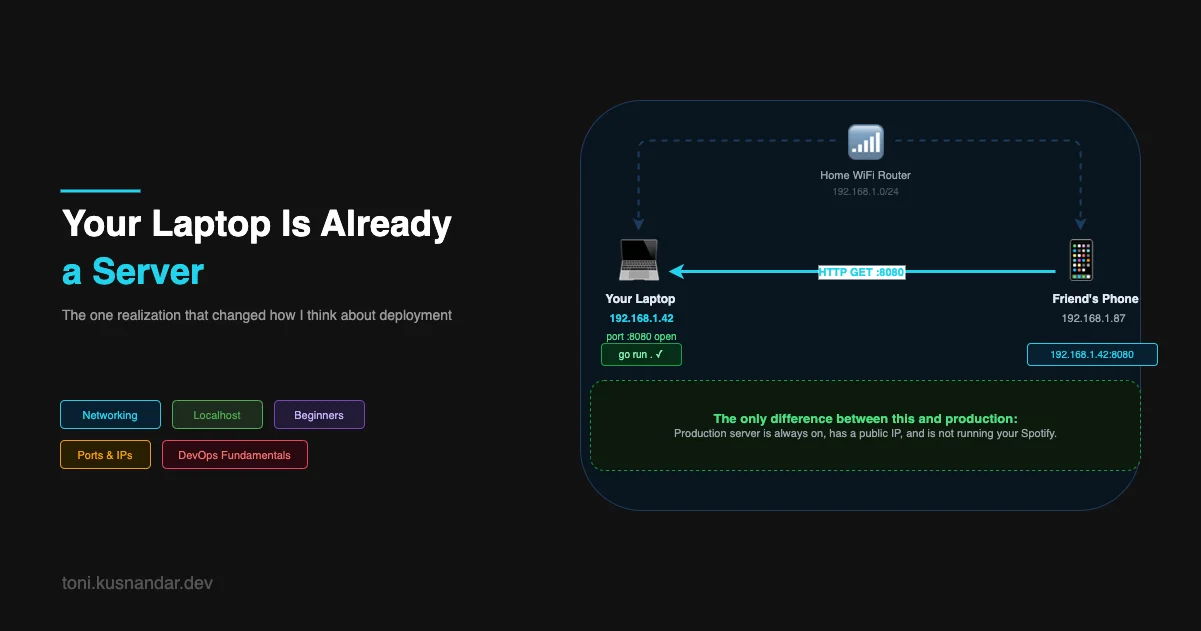
Here is the thing that made it click for me. If you are on a WiFi network, every device on that network has an IP address. Your laptop has one. Your phone has one. Your router assigned them both.
Find your laptop’s local IP. On Mac:
ipconfig getifaddr en0On Linux:
hostname -IYou will see something like 192.168.1.42. Now start your dev server, go to your phone (make sure it is on the same WiFi), and type 192.168.1.42:8080 in the browser.
Your app loads on your phone.
No deployment. No cloud. No VPS. You just served HTTP to another device. Your laptop was a server the whole time. You just did not have a way to reach it from outside your house.
Ports Are Just Doors
The port number is the part that confused me the longest. Why 8080? Why 3000? Why 5432 for Postgres?
Think of your IP address as a building address. Every device on a network has one. The port is the door number in that building. A building can have thousands of doors. Each door leads to a different service.
Port 80 is the standard door for HTTP. Port 443 for HTTPS. Port 5432 is where Postgres listens by default. Port 22 is SSH. When you run your dev server on 8080, you are just opening door 8080 and saying “I will answer requests that come through here.”
Your operating system keeps track of which process owns which port. That is why you get “address already in use” when you try to start two servers on the same port. Two processes cannot own the same door.
# See what is listening on your machine right now
lsof -i -P -n | grep LISTEN
Run that and you will see every port currently open on your laptop, and which process owns each one. You are probably already running more servers than you thought.
The Only Differences Between Your Laptop and a Production Server
So if your laptop is already a server, what actually changes when you “deploy”? Three things:
It is always on. Your laptop sleeps, you close the lid, you restart it. A production server runs 24/7. If someone tries to reach your app at 3am and your laptop is off, nothing answers.
It has a public IP address. Your home IP is usually dynamic (changes periodically) and your router blocks inbound connections by default. A production server has a static public IP that anyone on the internet can reach.
It is not running your Spotify and your IDE and your browser. Production servers are dedicated. They have predictable resources, no other processes competing for CPU and memory.
That is genuinely the whole difference. The code runs the same way. HTTP works the same way. The fundamentals are identical.
Why This Matters
I spent the first couple years of my career treating “deployment” like a mysterious ritual. Something separate from development, handled by different people with different skills. Understanding that my laptop was already a server made the whole concept of deployment collapse into something simple.
Deployment is just: taking your code and running it on a machine that is always on, publicly accessible, and dedicated to your app.
Everything else, VPS, containers, cloud functions, Kubernetes, is just different ways to solve the problem of “how do we run this reliably, at scale, without managing the physical machine ourselves.” But the core concept never changes.
When I finally ran my Go app on a $5 DigitalOcean VPS for the first time, it felt almost anticlimactic. I SSH’d in, copied my binary, ran it, and it worked. Same as my laptop. Just a different machine with a public IP.
Try It Right Now
If you have a dev server running, do this:
- Find your local IP (
ipconfig getifaddr en0on Mac) - Grab a phone or another device on the same WiFi
- Type
your-ip:your-portin the browser - Watch your app load
You just deployed to your first “server.” It happens to be your laptop, but the mechanics are identical to what happens on every cloud platform on earth.
In the next article I want to get into what deployment actually means at each stage, from copying files manually to a VPS all the way to what “cloud native” actually is in practice. The laptop experiment is the starting point. The journey from here gets interesting fast.