AWS Cost Optimization: 7 Ways to Cut Cloud Spending
Seven actionable AWS cost optimization techniques from real production audits: right-sizing, reserved capacity, storage tiering, NAT Gateway, data transfer, idle resources, and Savings Plans.
Cloud bills are easy to ignore when the business is growing. Then someone runs a report and the number is three times what was budgeted. I have seen this at startups, at agencies, and at enterprise teams. The technical culprits are usually the same.
This is not about cutting corners. None of these techniques reduce reliability or performance. They eliminate waste: over-provisioned resources, idle services, inefficient data transfer patterns, and missed pricing commitments.
I do FinOps consulting as part of my cloud cost optimization service. These seven techniques cover 80 to 90 percent of savings in every audit I run. Start with the highest-impact ones.
Before You Start: Get Visibility
You cannot optimize what you cannot see. Before touching any resource, spend a day understanding your spend:
# Enable Cost Explorer (if not already active) from the AWS Console
# Then use the CLI to get a spending summary

aws ce get-cost-and-usage \
  --time-period Start=2026-07-01,End=2026-07-31 \
  --granularity MONTHLY \
  --metrics "BlendedCost" \
  --group-by Type=DIMENSION,Key=SERVICE
This gives you a breakdown by service. In most accounts, the top 5 services account for 85 to 95 percent of the bill. Focus there.
Enable AWS Cost Anomaly Detection while you are at it:
aws ce create-anomaly-monitor \
  --anomaly-monitor '{"MonitorName":"AWS Services","MonitorType":"DIMENSIONAL","MonitorDimension":"SERVICE"}'
This sends alerts when spending on any service spikes unexpectedly. It costs nothing and catches runaway resources before they become a big bill.
Technique 1: Compute Savings Plans
This is the single highest-impact action with the least effort. If your team runs ECS Fargate, EC2, or Lambda consistently, Savings Plans save 20 to 40 percent on compute costs with zero architectural changes.
Savings Plans work as a commitment: you agree to spend a minimum dollar amount per hour on compute, and AWS discounts everything above that rate.
Compute Savings Plans are the most flexible. They apply to Fargate, EC2, and Lambda across all instance families, regions, and operating systems. Perfect for teams whose workload distribution changes over time.
How to purchase:
- Open AWS Cost Explorer
- Navigate to Savings Plans recommendations
- AWS shows your average hourly compute spend and a recommended commitment
- Purchase a 1-year no-upfront plan (highest flexibility, decent savings)
For a team spending 2000 USD per month on Fargate compute, a Savings Plan typically reduces that to 1200 to 1400 USD. The recommendation engine in Cost Explorer is accurate. Use it.
The only mistake to avoid: do not commit to more than your consistent baseline usage. Savings Plans apply to your actual usage up to the committed amount. If you commit to more than you use, you pay for the unused portion.
Technique 2: Right-Size ECS Fargate Tasks
Over-provisioning is the most common waste I find. The default pattern: allocate 1 vCPU and 2 GB memory per task because it feels safe. Check CloudWatch and find the service running at 8 percent CPU utilization.
Fargate charges for the CPU and memory you allocate per task, not what you use. A task with 1 vCPU running at 10 percent costs the same as a task running at 100 percent.
Find actual utilization:
aws cloudwatch get-metric-statistics \
  --namespace AWS/ECS \
  --metric-name CPUUtilization \
  --dimensions Name=ServiceName,Value=my-api Name=ClusterName,Value=my-cluster \
  --start-time 2026-07-01T00:00:00Z \
  --end-time 2026-07-28T00:00:00Z \
  --period 3600 \
  --statistics p95
Use p95 CPU utilization over the past 30 days as your baseline. Then set your task CPU to 150 percent of that value, rounded up to the nearest Fargate CPU unit.
Fargate CPU units: 256, 512, 1024, 2048, 4096. Memory must match valid combinations per the Fargate task size chart.
Example calculation:
Service running at p95 CPU of 150m (out of 1024m = 1 vCPU):
- Current allocation: 1024m CPU at 0.04048 USD per hour
- Target allocation: 256m CPU at 0.01012 USD per hour
- Savings: 75 percent per task
- For 5 tasks running 24/7: 120 USD per month saved
Same calculation for memory. If a service uses 180 MB at p95, allocate 512 MB. Do not allocate 2048 MB.
Use AWS Compute Optimizer for a more automated recommendation:
aws compute-optimizer get-ecs-service-recommendations \
  --service-arns arn:aws:ecs:ap-southeast-1:123456789012:service/my-cluster/my-api
This analyzes actual usage and recommends the optimal CPU and memory configuration.
Technique 3: Fix NAT Gateway Data Transfer Costs
NAT Gateway charges 0.045 USD per GB of data processed. That sounds cheap until you realize that ECS tasks pulling Docker images from ECR go through NAT Gateway by default, and a single 500 MB image pull costs 0.022 USD. Multiply by 10 deploys per day across 5 services and that is 0.55 USD per day, 200 USD per year, just for image pulls.
The fix: VPC endpoints for ECR and S3.
Without VPC endpoints:
ECS task → private subnet → NAT Gateway → internet → ECR
Cost: 0.045 USD per GB processed by NAT
With VPC endpoints:
ECS task → private subnet → VPC endpoint → ECR
Cost: 0.01 USD per GB (VPC endpoint data processing) - 77% cheaper
Terraform setup:
# S3 Gateway endpoint (free, no per-GB charge)
resource "aws_vpc_endpoint" "s3" {
  vpc_id       = aws_vpc.main.id
  service_name = "com.amazonaws.ap-southeast-1.s3"
  vpc_endpoint_type = "Gateway"
  route_table_ids = [aws_route_table.private.id]
}

# ECR endpoints (Interface type, small hourly cost + per-GB)
resource "aws_vpc_endpoint" "ecr_api" {
  vpc_id              = aws_vpc.main.id
  service_name        = "com.amazonaws.ap-southeast-1.ecr.api"
  vpc_endpoint_type   = "Interface"
  private_dns_enabled = true
  subnet_ids          = aws_subnet.private[*].id
  security_group_ids  = [aws_security_group.vpc_endpoint.id]
}

resource "aws_vpc_endpoint" "ecr_dkr" {
  vpc_id              = aws_vpc.main.id
  service_name        = "com.amazonaws.ap-southeast-1.ecr.dkr"
  vpc_endpoint_type   = "Interface"
  private_dns_enabled = true
  subnet_ids          = aws_subnet.private[*].id
  security_group_ids  = [aws_security_group.vpc_endpoint.id]
}
Interface endpoints cost 0.01 USD per hour per AZ plus 0.01 USD per GB processed. For most teams, this breaks even with NAT Gateway costs when you have moderate ECR traffic, and saves money at higher volumes.
Additionally, if your services access S3 from private subnets, the Gateway endpoint for S3 is free and eliminates all S3 data transfer charges through NAT Gateway. Always add the S3 Gateway endpoint.
Technique 4: S3 Storage Class Optimization
S3 Standard costs 0.023 USD per GB per month. Most data stored in S3 does not need Standard access speed. Application logs from 90 days ago, database backups from last year, media files that are rarely accessed, they all sit in Standard and generate a steady cost.
Storage class comparison:
| Class | Cost per GB/month | Access Pattern |
|---|---|---|
| Standard | 0.023 USD | Frequent access |
| Intelligent-Tiering | 0.023 USD + 0.0025 USD per 1000 objects | Unknown/variable |
| Standard-IA | 0.0125 USD | Less than once a month |
| Glacier Instant Retrieval | 0.004 USD | Archive, millisecond retrieval |
| Glacier Flexible Retrieval | 0.0036 USD | Archive, minutes to hours retrieval |
For application logs, implement a lifecycle policy:
resource "aws_s3_bucket_lifecycle_configuration" "logs" {
  bucket = aws_s3_bucket.logs.id

  rule {
    id     = "log-lifecycle"
    status = "Enabled"

    transition {
      days          = 30
      storage_class = "STANDARD_IA"  # After 30 days
    }

    transition {
      days          = 90
      storage_class = "GLACIER_IR"   # After 90 days
    }

    expiration {
      days = 365  # Delete after 1 year
    }
  }
}
For S3 buckets where access patterns are unpredictable, use Intelligent-Tiering. It monitors access and moves objects to cheaper tiers automatically with no retrieval fees:
resource "aws_s3_bucket_intelligent_tiering_configuration" "assets" {
  bucket = aws_s3_bucket.assets.id
  name   = "entire-bucket"

  tiering {
    access_tier = "DEEP_ARCHIVE_ACCESS"
    days        = 180
  }

  tiering {
    access_tier = "ARCHIVE_ACCESS"
    days        = 90
  }
}
For a team storing 10 TB of application logs, moving 80 percent to Glacier Instant Retrieval after 90 days saves roughly 1,500 USD per year.
Technique 5: Delete Idle Resources
Every AWS account accumulates idle resources over time. They cost real money and provide zero value. A systematic cleanup often finds 5 to 15 percent of the monthly bill in waste.
Common idle resources and their costs:
Unattached EBS volumes: Volumes remain after EC2 termination unless you set delete_on_termination = true. A 100 GB gp3 volume costs 8 USD per month sitting idle.
# Find unattached volumes
aws ec2 describe-volumes \
  --filters Name=status,Values=available \
  --query 'Volumes[*].{ID:VolumeId,Size:Size,Cost:Size}'
Unused Elastic IPs: 0.005 USD per hour when not associated with a running instance. 3.60 USD per month per IP. Accounts often accumulate dozens after experiments.
aws ec2 describe-addresses \
  --query 'Addresses[?AssociationId==null]'
Idle load balancers: An ALB costs 16 USD per month in LCU charges even with zero traffic.
aws elbv2 describe-load-balancers --query 'LoadBalancers[*].{ARN:LoadBalancerArn,DNS:DNSName}'
# Then check request count in CloudWatch for each ALB
Unused RDS snapshots: Manual snapshots accumulate and are charged at 0.095 USD per GB per month.
aws rds describe-db-snapshots \
  --snapshot-type manual \
  --query 'DBSnapshots[?SnapshotCreateTime<`2026-01-01`]'
Set up a monthly cleanup ritual. Run these checks, review the findings, and delete what is genuinely unused.
Technique 6: RDS Reserved Instances
If you run an RDS instance for more than 8 hours a day, you are leaving money on the table with on-demand pricing. Reserved Instances for RDS save 40 to 60 percent depending on the commitment term.
| Term | Payment | Savings vs On-Demand |
|---|---|---|
| 1 year, no upfront | Monthly | 40% |
| 1 year, all upfront | Once | 43% |
| 3 years, all upfront | Once | 60% |
For a db.t3.medium RDS PostgreSQL instance in ap-southeast-1:
- On-demand: 75 USD per month
- 1-year reserved, no upfront: 45 USD per month
- Savings: 30 USD per month, 360 USD per year
For a db.r6g.large, the savings are proportionally larger.
Purchase via the console or CLI:
aws rds purchase-reserved-db-instances-offering \
  --reserved-db-instances-offering-id <offering-id> \
  --reserved-db-instance-id my-production-db-reservation \
  --db-instance-count 1
Find the offering ID for your instance type and region using describe-reserved-db-instances-offerings.
Reserved Instances are non-refundable. Only commit to instances you know will run for the reservation period. For databases with uncertain lifetime, use a 1-year no-upfront term to preserve flexibility.
Technique 7: Review Data Transfer Costs
Data transfer costs are the most overlooked line item in AWS bills. They appear under EC2 but apply to almost every service.
The rules:
- Within same AZ: Free
- Between AZs in same region: 0.01 USD per GB in each direction
- Region to region: 0.02 USD per GB
- To internet: 0.09 USD per GB (first 10 TB)
The most common hidden cost: services in different AZs making frequent API calls to each other. An ECS service in AZ-a calling a service in AZ-b for every request generates 0.02 USD per GB of response data.
Fix: Deploy services in the same AZ for high-throughput communication:
resource "aws_ecs_service" "api" {
  # ...
  placement_constraints {
    type       = "memberOf"
    expression = "attribute:ecs.availability-zone == ap-southeast-1a"
  }
}
This limits high-throughput service pairs to the same AZ. For fault tolerance, run multiple independent deployments per AZ rather than distributing a single service across AZs.
Use CloudFront for user-facing content: CloudFront to internet costs 0.0085 USD per GB (first 10 TB), versus 0.09 USD for direct S3 or ALB to internet. A 10x difference. For applications with significant static asset delivery, CloudFront pays for itself quickly.
Putting It All Together
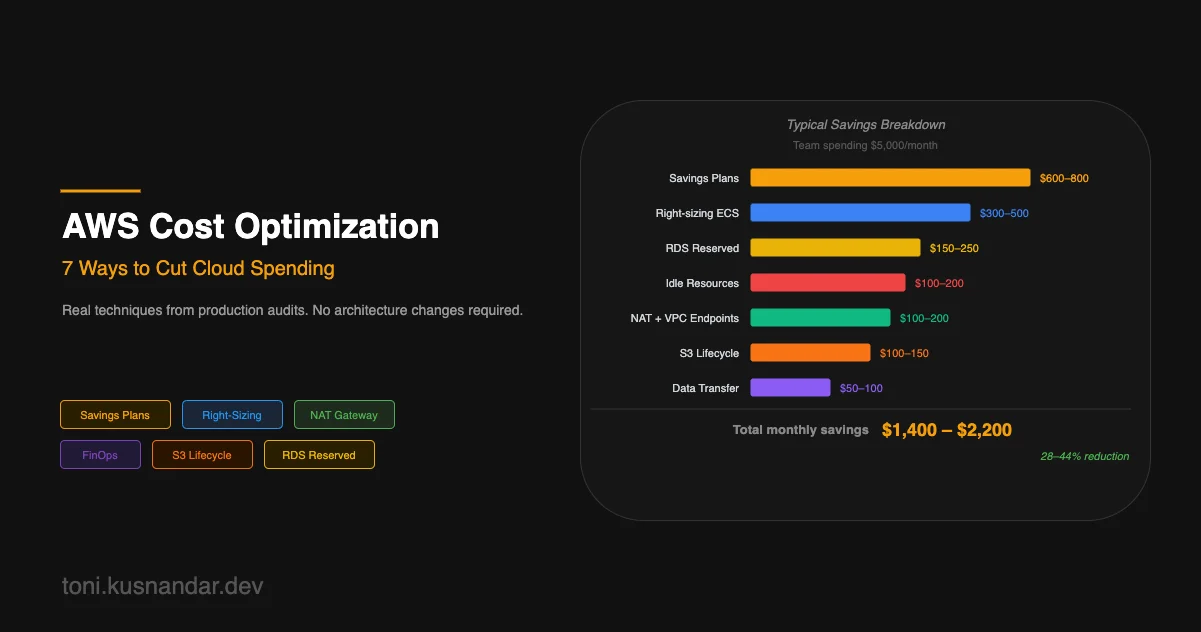
Typical savings breakdown for a team spending 5,000 USD per month:
| Technique | Estimated Savings |
|---|---|
| Savings Plans | 600-800 USD |
| Right-sizing ECS tasks | 300-500 USD |
| NAT Gateway + VPC endpoints | 100-200 USD |
| S3 lifecycle policies | 100-150 USD |
| Idle resource cleanup | 100-200 USD |
| RDS Reserved Instances | 150-250 USD |
| Data transfer optimization | 50-100 USD |
| Total | 1,400-2,200 USD/month |
Start with Savings Plans and right-sizing. They require no architectural changes and deliver the most savings. Then work through the others in order of complexity.
Cost optimization is not a one-time project. It is a quarterly habit. AWS releases new services and pricing changes constantly. What was optimal 12 months ago may not be today.
If you want a professional cost audit, my cloud cost optimization service includes a full account analysis, prioritized savings recommendations, and implementation support. The DevOps automation retainer also includes monthly cost review as a standard deliverable.
For context on the infrastructure patterns that enable these optimizations, see my guide on AWS architecture for small teams and ECS Fargate architecture decisions.