Migrating from Heroku to AWS ECS: Lessons Learned and Cost Breakdown
A real migration case study moving three Node.js and Go services from Heroku to AWS ECS Fargate: architecture decisions, migration steps, pitfalls, and before and after cost comparison.
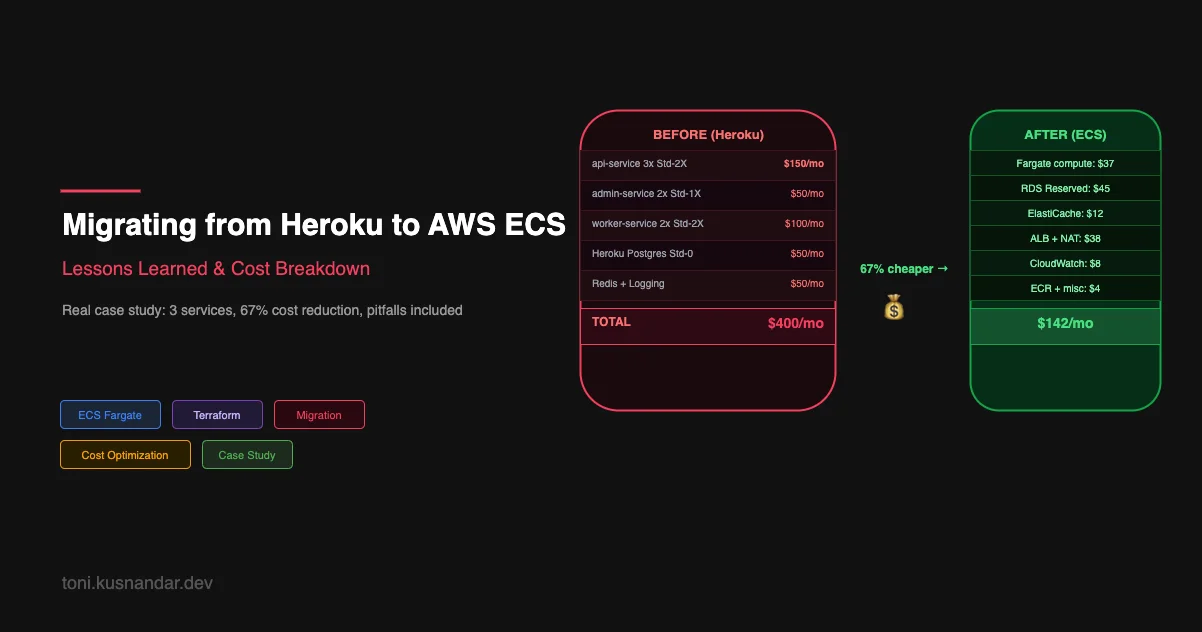
Heroku is a great platform for getting something running fast. It abstracts infrastructure completely and lets you focus on the application. But at scale, the abstraction comes at a price premium. And since Heroku removed the free tier and raised dyno prices, the economics shifted dramatically for many teams.
This is a case study of migrating three services, two Node.js APIs and one Go background worker, from Heroku to AWS ECS Fargate. I will cover the architecture decisions, the migration approach, what broke, and the actual cost numbers before and after.
This is not a comparison of platforms. Heroku has real advantages. This is about what the migration looks like in practice if you decide to make the move.
Starting Point: The Heroku Setup
Before migration, the stack looked like this:
Services on Heroku:
api-service: Node.js REST API, Standard-2X dyno x3, Heroku Postgres Standard-0admin-service: Node.js admin API, Standard-1X dyno x2worker-service: Go background worker, Standard-2X dyno x2
Monthly cost breakdown:
| Resource | Price |
|---|---|
| api-service: 3x Standard-2X dynos | 150 USD |
| admin-service: 2x Standard-1X dynos | 50 USD |
| worker-service: 2x Standard-2X dynos | 100 USD |
| Heroku Postgres Standard-0 | 50 USD |
| Heroku Data for Redis | 30 USD |
| Papertrail log management | 20 USD |
| SSL certificates via Heroku | Included |
| Total | 400 USD |
With the price increase, this was heading toward 600 USD per month for the same setup. That was the trigger.
Target Architecture on AWS
The AWS target architecture:
Route 53
    │
    ▼
CloudFront (optional, for edge caching)
    │
    ▼
ALB (HTTPS:443)
    │
    ├── /api/*     → api-service ECS Service (2 Fargate tasks)
    └── /admin/*   → admin-service ECS Service (1 Fargate task)

VPC Private Subnet:
    ├── ECS Tasks (api, admin, worker)
    ├── RDS PostgreSQL (db.t3.medium)
    └── ElastiCache Redis (cache.t3.micro)

ECR: Container image registry
CloudWatch Logs: Centralized logging
SSM Parameter Store: Secrets management
Worker service has no ALB. It pulls jobs from a queue and runs in private subnets without public exposure.
Step 1: Dockerize the Applications
Heroku uses buildpacks to build and run applications. For ECS, you need Dockerfiles. This was the first actual work.
Node.js API Dockerfile
# Build stage
FROM node:20-alpine AS builder

WORKDIR /app
COPY package*.json ./
RUN npm ci --only=production

COPY . .

# Runtime stage
FROM node:20-alpine

WORKDIR /app

# Run as non-root user
RUN addgroup -S appgroup && adduser -S appuser -G appgroup
USER appuser

COPY --from=builder --chown=appuser:appgroup /app/node_modules ./node_modules
COPY --from=builder --chown=appuser:appgroup /app/src ./src
COPY --from=builder --chown=appuser:appgroup /app/package.json ./

EXPOSE 3000

CMD ["node", "src/index.js"]
The main differences from a standard Heroku Node.js app:
- Explicit port via
EXPOSEandPORTenv var - Non-root user for security
- Multi-stage build to minimize image size
Health Check Endpoint
Heroku monitors dynos differently from how ALB monitors ECS tasks. You need an explicit health check endpoint:
// Express health check
app.get('/health', (req, res) => {
  res.json({ status: 'ok', timestamp: new Date().toISOString() });
});

// Readiness check (includes database connectivity)
app.get('/ready', async (req, res) => {
  try {
    await db.query('SELECT 1');
    res.json({ status: 'ready' });
  } catch (err) {
    res.status(503).json({ status: 'unhealthy', error: err.message });
  }
});
ECS ALB health checks hit /health every 10 seconds. If the endpoint returns non-200 for 3 consecutive checks, ECS replaces the task.
Step 2: AWS Infrastructure with Terraform
The full infrastructure took about 3 days to build. Here are the key pieces:
VPC and Networking
module "vpc" {
  source  = "terraform-aws-modules/vpc/aws"
  version = "5.1.2"

  name = "my-app-vpc"
  cidr = "10.0.0.0/16"

  azs             = ["ap-southeast-1a", "ap-southeast-1b"]
  private_subnets = ["10.0.1.0/24", "10.0.2.0/24"]
  public_subnets  = ["10.0.101.0/24", "10.0.102.0/24"]

  enable_nat_gateway = true
  single_nat_gateway = true  # Cost optimization: one NAT for non-prod

  tags = {
    Environment = "production"
    ManagedBy   = "terraform"
  }
}
For production, consider one_nat_gateway_per_az = true for HA. For cost savings, a single NAT is fine if brief NAT downtime during AZ failure is acceptable.
ECS Cluster and Services
resource "aws_ecs_cluster" "main" {
  name = "my-app-cluster"

  setting {
    name  = "containerInsights"
    value = "enabled"
  }
}

resource "aws_ecs_task_definition" "api" {
  family                   = "api-service"
  requires_compatibilities = ["FARGATE"]
  network_mode             = "awsvpc"
  cpu                      = "512"    # 0.5 vCPU (down from Standard-2X equivalent)
  memory                   = "1024"   # 1 GB
  execution_role_arn       = aws_iam_role.ecs_execution.arn
  task_role_arn            = aws_iam_role.ecs_task.arn

  container_definitions = jsonencode([{
    name  = "api"
    image = "${aws_ecr_repository.api.repository_url}:latest"

    portMappings = [{
      containerPort = 3000
      protocol      = "tcp"
    }]

    environment = [
      { name = "NODE_ENV", value = "production" },
      { name = "PORT", value = "3000" }
    ]

    secrets = [
      {
        name      = "DATABASE_URL"
        valueFrom = aws_ssm_parameter.database_url.arn
      },
      {
        name      = "REDIS_URL"
        valueFrom = aws_ssm_parameter.redis_url.arn
      }
    ]

    logConfiguration = {
      logDriver = "awslogs"
      options = {
        "awslogs-group"         = aws_cloudwatch_log_group.api.name
        "awslogs-region"        = "ap-southeast-1"
        "awslogs-stream-prefix" = "api"
      }
    }

    healthCheck = {
      command     = ["CMD-SHELL", "curl -f http://localhost:3000/health || exit 1"]
      interval    = 30
      timeout     = 5
      retries     = 3
      startPeriod = 60  # Grace period for application startup
    }
  }])
}
RDS Migration from Heroku Postgres
Heroku Postgres Standard-0 is a shared PostgreSQL instance. For ECS, we moved to RDS PostgreSQL.
resource "aws_db_instance" "main" {
  identifier        = "my-app-production"
  engine            = "postgres"
  engine_version    = "16.2"
  instance_class    = "db.t3.medium"
  allocated_storage = 20
  storage_type      = "gp3"
  storage_encrypted = true

  db_name  = "myapp"
  username = "dbadmin"
  password = random_password.db.result  # Stored in SSM, not state

  vpc_security_group_ids = [aws_security_group.rds.id]
  db_subnet_group_name   = aws_db_subnet_group.main.name
  publicly_accessible    = false

  backup_retention_period = 7
  skip_final_snapshot     = false
  final_snapshot_identifier = "my-app-production-final"

  deletion_protection = true

  lifecycle {
    prevent_destroy = true
  }
}
Data Migration from Heroku Postgres
# 1. Create a backup from Heroku
heroku pg:backups:capture --app my-heroku-app
heroku pg:backups:download --app my-heroku-app

# 2. The downloaded file is latest.dump (pg_dump format)
# Restore to RDS
pg_restore \
  --host my-app-production.cluster.ap-southeast-1.rds.amazonaws.com \
  --port 5432 \
  --username dbadmin \
  --dbname myapp \
  --no-owner \
  --no-acl \
  latest.dump

# 3. Verify record counts match
psql -h heroku-host -c "SELECT count(*) FROM users;"
psql -h rds-host -c "SELECT count(*) FROM users;"
Test the restoration on a staging RDS instance before touching production.
Step 3: CI/CD Pipeline
Heroku deployments used git push heroku main. For ECS, we set up GitHub Actions following the pattern from my CI/CD pipeline guide.
Key additions versus a standard ECS pipeline:
# Build and push to ECR
- name: Build and push
  env:
    IMAGE_TAG: ${{ github.sha }}
  run: |
    docker build -t $ECR_REGISTRY/$ECR_REPO:$IMAGE_TAG .
    docker push $ECR_REGISTRY/$ECR_REPO:$IMAGE_TAG

# Run database migrations before deploying new code
- name: Run migrations
  run: |
    aws ecs run-task \
      --cluster my-app-cluster \
      --task-definition api-migrations \
      --launch-type FARGATE \
      --network-configuration "awsvpcConfiguration={subnets=[subnet-xxx],securityGroups=[sg-xxx]}" \
      --overrides '{"containerOverrides":[{"name":"api","command":["node","migrate.js"]}]}'
Database migrations run as a one-shot ECS task before the service deploys. The pipeline waits for the migration task to complete before proceeding with deployment.
Step 4: The Traffic Migration
We did not do a hard cutover. Instead, we used weighted DNS routing to gradually shift traffic from Heroku to ECS over two weeks.
# Route 53 weighted routing: start with 10% to ECS
aws route53 change-resource-record-sets \
  --hosted-zone-id XXXX \
  --change-batch '{
    "Changes": [
      {
        "Action": "UPSERT",
        "ResourceRecordSet": {
          "Name": "api.example.com",
          "Type": "CNAME",
          "SetIdentifier": "heroku",
          "Weight": 90,
          "TTL": 60,
          "ResourceRecords": [{"Value": "my-app.herokuapp.com"}]
        }
      },
      {
        "Action": "UPSERT",
        "ResourceRecordSet": {
          "Name": "api.example.com",
          "Type": "A",
          "SetIdentifier": "ecs",
          "Weight": 10,
          "AliasTarget": {
            "HostedZoneId": "Z14GRHDCWA56QT",
            "DNSName": "my-alb.ap-southeast-1.elb.amazonaws.com",
            "EvaluateTargetHealth": true
          }
        }
      }
    ]
  }'
Migration timeline:
- Day 1: 10 percent ECS, monitor error rates and latency
- Day 3: 30 percent ECS, no issues observed
- Day 7: 70 percent ECS, latency on ECS slightly better
- Day 10: 100 percent ECS
- Day 14: Decommission Heroku
The gradual approach meant any issues on ECS affected only a fraction of traffic. We caught two bugs during the 10 percent phase that would have been production incidents with a hard cutover.
What We Got Wrong
Underestimating Heroku Abstractions
Heroku manages things you forget exist until they break:
Log routing: Heroku automatically routes logs to wherever you configure. On ECS, we had to explicitly configure the awslogs log driver on every container and set up CloudWatch log groups. We missed this for the worker service initially, which meant the first week of worker logs were lost.
Dyno restart on OOM: Heroku restarts a dyno automatically if it runs out of memory. ECS does the same, but you need to configure memory limits correctly. We initially set memory limits too low on the Node.js services, causing unnecessary task replacements during traffic spikes.
SSL/TLS: Heroku gives you free SSL via Let is Encrypt. On AWS, you need ACM certificates and ALB HTTPS listeners. We forgot to set up HTTP to HTTPS redirect on the ALB initially.
Database Connection Handling
Heroku Postgres has connection limits per plan. Our services were connecting directly without pooling because the limits were enforced by Heroku. On RDS, we removed that constraint and suddenly had 200 simultaneous connections from 5 application instances.
We added PgBouncer as a connection pooler in the ECS cluster:
resource "aws_ecs_task_definition" "pgbouncer" {
  family = "pgbouncer"
  # ...
  container_definitions = jsonencode([{
    name  = "pgbouncer"
    image = "bitnami/pgbouncer:latest"
    environment = [
      { name = "POSTGRESQL_HOST", value = aws_db_instance.main.address },
      { name = "PGBOUNCER_POOL_MODE", value = "transaction" },
      { name = "PGBOUNCER_MAX_CLIENT_CONN", value = "200" },
      { name = "PGBOUNCER_DEFAULT_POOL_SIZE", value = "20" }
    ]
  }])
}
Application services now connect to PgBouncer, which maintains a pool of 20 connections to RDS. This is now standard in all my ECS setups.
Secrets Management During Migration
Heroku config vars are easy to set and read. Moving to SSM Parameter Store required updating every service to read from SSM or restructuring environment variable injection via ECS task definition secrets.
We chose the ECS secrets approach: store in SSM, reference in task definition. This meant two rounds of changes: populate SSM with all secrets, then update task definitions to use secrets instead of hardcoded values.
Cost Comparison: Before and After
After migration (fully optimized with right-sizing and Savings Plans):
| Resource | Monthly Cost |
|---|---|
| ECS Fargate: api-service 2 tasks (512 CPU, 1024 MB) | 22 USD |
| ECS Fargate: admin-service 1 task (256 CPU, 512 MB) | 5 USD |
| ECS Fargate: worker-service 2 tasks (256 CPU, 512 MB) | 10 USD |
| RDS PostgreSQL db.t3.medium (reserved, 1 year) | 45 USD |
| ElastiCache Redis cache.t3.micro | 12 USD |
| ALB | 18 USD |
| CloudWatch Logs | 8 USD |
| NAT Gateway | 20 USD |
| ECR storage | 2 USD |
| ACM certificates | Free |
| Total | 142 USD |
Before (Heroku): 400 USD per month, heading toward 600 USD.
Savings: 64 percent, approximately 260 USD per month.
The Savings Plan reduced Fargate costs by 30 percent. Right-sizing the tasks compared to Standard-2X dynos dropped compute cost significantly. RDS Reserved Instance halved the database cost versus on-demand.
When Not to Migrate
To be honest about the tradeoffs:
Stay on Heroku if:
- Your team has no DevOps experience and no time to learn
- You are early-stage and operational simplicity is more valuable than cost savings
- Your monthly Heroku bill is under 200 USD (savings do not justify migration effort)
- You rely on Heroku add-ons with no easy AWS equivalent
Migrate to ECS if:
- Your Heroku bill is over 300 USD per month
- You want full control over your infrastructure
- You need features Heroku does not provide: custom networking, VPC, specific AWS integrations
- You have or plan to hire DevOps capability
The migration took approximately 4 weeks of part-time effort. At 260 USD per month savings, it paid for itself in under 6 months.
Wrapping Up
Migrating from Heroku to ECS is a good trade once your costs justify the operational complexity. The key decisions:
- Use Terraform for all infrastructure so you can reproduce it reliably
- Migrate traffic gradually with weighted DNS, not all at once
- Account for everything Heroku was doing for you silently
- Add connection pooling from day one
If you want help planning or executing a Heroku to ECS migration, I offer DevOps support that covers architecture design, Terraform implementation, and traffic migration. This kind of migration is also covered in my DevOps for small teams guide in the infrastructure modernization section.
For the full ECS architecture context, see why I choose ECS Fargate over Kubernetes and AWS architecture patterns for small teams. The CI/CD setup used in this migration is detailed in GitHub Actions to ECS deploy pipeline.