What Deployment Actually Means
Deployment is not magic. It is just running your code on a different machine. But understanding each stage, from FTP to cloud, changes how you think about the whole process.
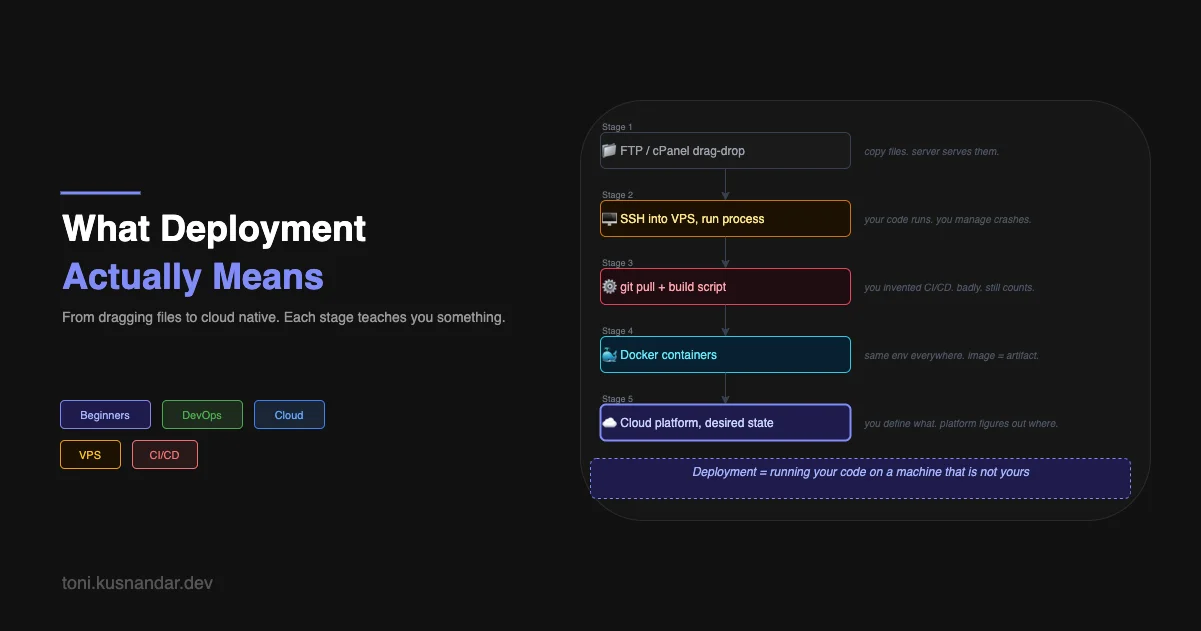
The first time someone told me to “deploy” something, I nodded like I understood and then immediately Googled “how to deploy a website.”
The results were not helpful. Some said upload files via FTP. Some said use Heroku. Some talked about Docker. Some mentioned AWS. They all seemed to be describing different things, and none of them explained what deployment fundamentally was.
I eventually figured it out through doing it badly many times. Here is the definition I wish I had from the start.
The One-Sentence Definition
Deployment is making your code run on a machine that is accessible to whoever needs to use it.
That is it. Everything else, the tooling, the process, the platforms, is just different ways to do that reliably as your requirements grow.
Stage 1: Copy the Files
The most primitive form of deployment I ever did was dragging files into an FTP client.
I had a shared hosting account. I had an HTML file on my laptop. Deployment meant opening FileZilla, connecting to the server, and dragging my index.html into the public_html folder.
It worked. Someone else could open a browser and see my page. The code was running on a different machine. By the actual definition, I had deployed.
What I did not understand then was what “running” meant for a static HTML file. The answer is: nothing executes. The server just sends the file to whoever requests it. There is no process, no port, no server code of my own. Just the web server (Apache or Nginx) handling the file transfer.
This matters because it is a genuinely different model from what comes next.
Stage 2: Your Code Actually Runs
When I started building backend APIs, everything changed. An HTML file is passive. A Go or Node or Python server is active. It starts, it binds to a port, it sits there running, waiting for requests.
Deploying this meant: get my code onto a different machine, and make sure it keeps running.
My first attempt was a $5 DigitalOcean VPS. I SSH’d in, cloned my git repo, ran go build, ran the binary. It worked. Then I closed my SSH session and the process died.
I had not thought about that. On my laptop, I run things in a terminal and leave it open. On a server, you need the process to keep running after you disconnect.
# The naive solution: run in background
./my-api &

# The problem: it dies if the server reboots
# And you have no idea if it crashed
That is when I learned about process managers. systemd, supervisor, pm2. Tools whose entire job is “make sure this process keeps running, restart it if it crashes, start it on boot.”
# /etc/systemd/system/my-api.service
[Unit]
Description=My API Server
After=network.target

[Service]
Type=simple
User=deploy
WorkingDirectory=/home/deploy/my-api
ExecStart=/home/deploy/my-api/bin/server
Restart=always
RestartSec=5

[Install]
WantedBy=multi-user.target
sudo systemctl enable my-api
sudo systemctl start my-apiNow the process survives disconnects and reboots. That is a real deployment.
Stage 3: The Problem of Getting Code There
At some point copying code to a server by hand starts to feel wrong. You make a change, you have to SSH in, pull the latest code, rebuild, restart the service. Do this ten times a day and it becomes the most tedious part of your job.
I wrote a shell script:
#!/bin/bash
set -e

ssh deploy@my-server << 'ENDSSH'
  cd /home/deploy/my-api
  git pull origin main
  go build -o bin/server ./cmd/api
  sudo systemctl restart my-api
ENDSSH

echo "Deployed"
I ran this script. It worked. I felt like a genius.
What I had accidentally invented was a primitive deployment pipeline. A trigger (me running the script) followed by a series of steps that moved code from one place to another and restarted the service.
The next evolution was obvious: make something else run that script automatically when I push to GitHub. That is continuous deployment. I had understood it conceptually before I understood CI/CD as a term.
Stage 4: The Environment Problem
Here is where “it works on my machine” becomes a real crisis.
My laptop runs macOS. My server runs Ubuntu. Same Go code compiles fine on both, so for a while this did not matter much. But then I needed a newer version of some library. Then a system dependency. Then my coworker joined and he ran Windows. Then staging was on a different Ubuntu version than production.
At some point the energy spent managing environments exceeded the energy spent writing code. That is the problem Docker solves, and it is worth understanding before introducing the solution.
The thing I want you to notice is the progression. Each stage introduces a new problem:
- FTP: how do I even get code there?
- VPS + systemd: how do I keep it running?
- Deploy scripts: how do I stop doing this manually?
- Multiple environments: how do I make sure the same code runs the same way everywhere?
Containers solve stage 4. CI/CD platforms solve stage 3 properly. Cloud platforms add abstraction on top of all of it.
Stage 5: Describing Desired State
The biggest mental shift in my understanding of deployment happened when I started using cloud platforms properly.
The shift is from “run this command on this machine” to “here is what I want running, figure out where to put it.”
With a VPS, you are managing a machine. You care about disk space, you care about what else is running on it, you care about the OS version. With ECS Fargate or Kubernetes or Cloud Run, you stop thinking about machines. You say “I want 2 copies of this container, each with 512MB of memory, restart if they crash.” The platform handles everything else.
# ECS task definition - you describe what you want
containerDefinitions:
  - name: api
    image: my-account.dkr.ecr.region.amazonaws.com/my-api:latest
    memory: 512
    cpu: 256
    portMappings:
      - containerPort: 8080
The platform decides which physical machine runs this. The platform handles restarts. The platform handles scaling. You just describe the desired state and let it converge.
This is what “cloud native” actually means. Not “runs on AWS.” It means you have stopped caring about machines and started caring only about your application’s desired state.
Why Understanding the Stages Matters
I have worked with engineers who jumped straight to Kubernetes without ever running something on a bare VPS. They can write YAML manifests but they have no idea what happens underneath. When something breaks, they are lost.
I have also worked with engineers stuck at stage 2, SSHing into servers and running deployments by hand, because they learned that way and never pushed further.
The stages build on each other. The problems at each stage motivate the tools at the next stage. Understanding the progression means you understand why the tools exist, not just how to use them.
The next two articles dig into what this actually looks like for a frontend app and a backend API specifically, because the deployment story is different for each one, and the differences are worth understanding separately.
If you are already past the basics and want to see the full production picture, GitOps, Terraform, automatic reconciliation, the From Manual Deploy to GitOps article covers exactly that evolution in more depth.