From Manual Deploy to GitOps: A Practical Migration Journey
How to evolve from SSH deploys and manual steps to a full GitOps workflow where Git is the single source of truth for infrastructure and application state.
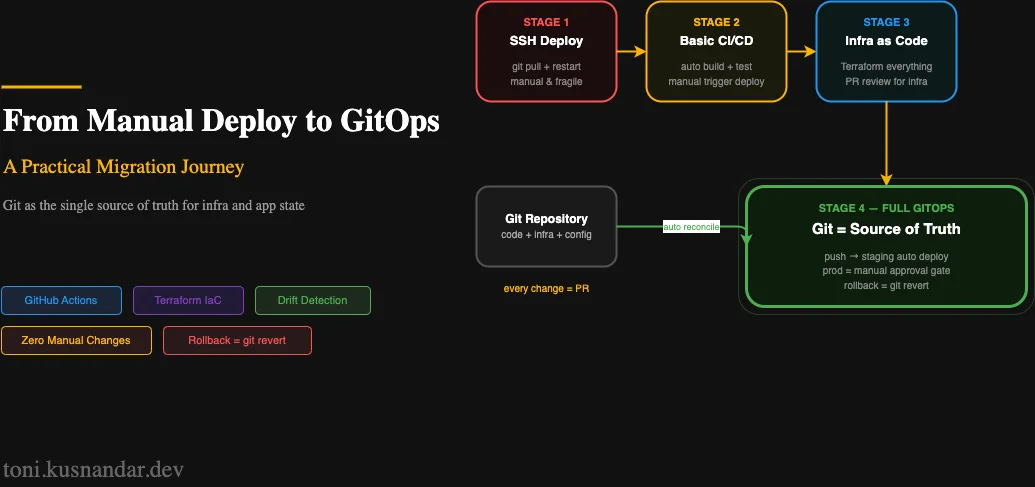
Every team starts somewhere. For most, that somewhere is SSH access and a deployment that “someone just knows how to do.” This article is about the journey from there to a GitOps workflow where every change is tracked, reviewed, automated, and reversible.
I have made this transition with multiple teams. The path is not linear. Each stage adds real operational value before you invest in the next one. You do not need to reach the end to benefit from moving forward.
This is an opinion piece as much as a technical guide. There are real tradeoffs at each stage, and the right stopping point depends on your team’s capacity and risk tolerance.
Stage 0: The Manual Era
Most teams start here and stay longer than they should. The deployment process lives in someone’s head or in a Confluence doc that was last updated two years ago.
Typical symptoms:
- “Ask [person] how to deploy”
- Production has settings that nobody knows how they got there
- Rollback means SSHing in and reversing what you did manually
- Deploys require a specific person to be available
- Staging and production drift apart silently over weeks
The risk is not just operational inconvenience. Every manual step is a source of human error. The console change that opened port 22 to 0.0.0.0/0 “temporarily” and never got closed. The environment variable updated on the server but not in the configuration file. These are real incidents.
The goal of this article is to get you off Stage 0 and moving through the stages at whatever pace your team can sustain.
Stage 1: Automated Builds and Basic CI
The first step is making the build reproducible. Nothing deploys faster than a broken build that works on the developer machine but fails in production.
What changes:
- All services run in Docker containers with explicit Dockerfiles
- A CI system runs tests on every push
- Docker images are built and pushed to a registry automatically
What stays manual:
- The actual deployment still requires a human to trigger
- Infrastructure changes still happen via console or SSH
This stage solves the “works on my machine” problem. Tests catch regressions before they reach production. The build process is documented in code rather than in someone’s memory.
A minimal GitHub Actions workflow for this stage:
name: Build and Test

on:
  push:
    branches: [main, develop]
  pull_request:
    branches: [main]

jobs:
  test:
    runs-on: ubuntu-latest
    steps:
      - uses: actions/checkout@11bd71901bbe5b1630ceea73d27597364c9af683  # v4.2.2

      - name: Run tests
        run: |
          docker compose up -d db
          docker compose run --rm app npm test

  build:
    needs: test
    runs-on: ubuntu-latest
    if: github.ref == 'refs/heads/main'
    steps:
      - uses: actions/checkout@11bd71901bbe5b1630ceea73d27597364c9af683

      - name: Build Docker image
        run: docker build -t myapp:${{ github.sha }} .
The value is immediate: broken code cannot reach staging because the build fails first.
Stage 2: Automated Deployment to Staging
Once builds are reliable, automate deployment to staging. Every merge to main should automatically deploy to staging. No manual steps, no “can you push the button for me.”
What changes:
- Staging deploys automatically on every merge to main
- Deployment is fully scripted and reproducible
- Developers can see the result of their changes in staging within minutes
What stays manual:
- Production deployment still requires intentional human action
- Infrastructure is still managed manually
This is the point where the feedback loop tightens significantly. A developer pushes code, sees it running in staging in 5 minutes, and gets immediate signal on whether the change works as expected in a real environment.
See my CI/CD with GitHub Actions and ECS guide for the full pipeline implementation at this stage. The OIDC authentication, ECR push, and ECS deploy workflow described there brings you to Stage 2 completely.
Stage 3: Infrastructure as Code
The most underrated step in the maturity journey. Applications get versioned and reviewed. Infrastructure changes happen via console clicks that nobody tracks.
The problem with console-managed infrastructure:
- No history of who changed what and why
- Changes between environments are inconsistent
- Disaster recovery means “trying to remember what was set up”
- Drift accumulates silently until something breaks
What changes:
- All infrastructure moves to Terraform
- Every resource has a corresponding
.tffile - Infrastructure changes go through pull request review
terraform planoutput is reviewed before everyterraform apply
# Before: nobody knows why this security group exists or who created it
# After: it is in Git with a commit message and PR description

resource "aws_security_group" "api_service" {
  name        = "api-service-sg"
  description = "Allow traffic from ALB to API service containers"
  vpc_id      = aws_vpc.main.id

  ingress {
    from_port       = 3000
    to_port         = 3000
    protocol        = "tcp"
    security_groups = [aws_security_group.alb.id]
  }

  egress {
    from_port   = 0
    to_port     = 0
    protocol    = "-1"
    cidr_blocks = ["0.0.0.0/0"]
  }

  tags = {
    Name        = "api-service-sg"
    ManagedBy   = "terraform"
    Environment = "production"
  }
}
The ManagedBy = "terraform" tag is a communication tool. Anyone looking at this resource in the console sees it is managed by code. Manual changes will be overwritten by the next terraform apply.
Enforce this culturally: the AWS console is read-only for production. If you need to make a change, write the Terraform first.
See my Terraform lessons from production projects for the patterns that make IaC sustainable at scale.
Stage 4: Production Deployment Automation with Approval Gates
At this point, staging deploys automatically and infrastructure is in code. The last gap is production deployment, which still requires a human to manually trigger a script or console action.
Automate production deployment but add a mandatory approval gate.
What changes:
- Production deployment is automated but requires explicit reviewer approval
- The same pipeline that deploys to staging promotes to production after approval
- Every production deployment is recorded with who approved and when
GitHub Actions with environment protection:
jobs:
  deploy-staging:
    environment: staging
    runs-on: ubuntu-latest
    steps:
      - name: Deploy to staging
        run: # deploy commands

  deploy-production:
    needs: deploy-staging
    environment: production  # Requires reviewer approval configured in GitHub
    runs-on: ubuntu-latest
    steps:
      - name: Deploy to production
        run: # same deploy commands, different environment variables
The production environment in GitHub settings has required reviewers. After staging deploy succeeds, a reviewer approves, and the same workflow deploys to production with production credentials.
The reviewer is not approving the code. The code was reviewed in the pull request. The reviewer is answering: is now a good time to deploy? Are there any open incidents? Did staging validation pass?
Stage 5: GitOps - Git as the Source of Truth
The final stage is a mindset shift as much as a technical change. In a GitOps workflow, Git is the authoritative description of what should be running. The system continuously reconciles actual state with desired state.
The core principles:
-
Declarative: The entire system state is described declaratively. Terraform for infrastructure, container definitions for services, configuration in files.
-
Versioned and immutable: All changes go through Git. Every state is tagged with a commit SHA. You can reconstruct any historical state.
-
Automatic reconciliation: The system detects drift and either corrects it automatically or alerts you.
-
Reviewed and auditable: Every change has a PR, a reviewer, and a merge commit. The audit trail is the Git log.
Drift Detection
The key technical addition at this stage is automated drift detection. Terraform plan runs on a schedule and alerts if the actual state has diverged from the declared state:
# .github/workflows/drift-check.yml
name: Infrastructure Drift Check

on:
  schedule:
    - cron: '0 8 * * 1-5'  # Weekday mornings

jobs:
  drift:
    runs-on: ubuntu-latest
    steps:
      - uses: actions/checkout@11bd71901bbe5b1630ceea73d27597364c9af683

      - name: Configure AWS credentials
        uses: aws-actions/configure-aws-credentials@e3dd6a429d7300a6a4c196c26e071d42e0343502  # v4.0.2
        with:
          role-to-assume: ${{ secrets.AWS_ROLE_ARN }}
          aws-region: ap-southeast-1

      - name: Terraform init
        run: terraform init
        working-directory: terraform/environments/production

      - name: Terraform plan
        id: plan
        run: |
          terraform plan -detailed-exitcode -out=tfplan 2>&1
          echo "exit_code=$?" >> $GITHUB_OUTPUT
        working-directory: terraform/environments/production
        continue-on-error: true

      - name: Alert on drift
        if: steps.plan.outputs.exit_code == '2'
        uses: 8398a7/action-slack@v3
        with:
          status: custom
          custom_payload: |
            {
              "text": "Infrastructure drift detected in production. Review: ${{ github.server_url }}/${{ github.repository }}/actions/runs/${{ github.run_id }}"
            }
        env:
          SLACK_WEBHOOK_URL: ${{ secrets.SLACK_WEBHOOK }}
Exit code 2 from terraform plan -detailed-exitcode means changes were detected. A Slack alert fires and an engineer investigates whether the drift was an unauthorized manual change or a legitimate difference that needs to be incorporated into Terraform.
Enforcing the Discipline
Technical enforcement:
- IAM policies that prevent manual changes to production resources from developer accounts. Only the pipeline role has write access.
- SCPs at the AWS Organization level for organizations with multiple accounts.
- Terraform state locking to prevent parallel applies.
Cultural enforcement:
- Code review required for all Terraform and application changes.
- Post-incident review when manual changes are discovered.
- Regular drift detection reports to make the team aware of the current state.
The Honest Assessment of Each Stage
Not every team needs to reach Stage 5. Here is my honest take on where to stop based on your context:
Small startup, solo developer: Stage 2 is sufficient. Automated staging deploys with manual production promotion. This gives you reproducible builds and a basic deployment pipeline without the overhead of IaC.
Small team, 3-10 engineers: Stage 3 is the sweet spot. IaC gives you the most operational leverage for the investment. Everyone can understand and modify infrastructure. Incidents become reproducible.
Growing team, 10+ engineers: Stage 4-5 is necessary. Manual production gates break down when multiple teams deploy multiple times per day. Automated production with approval gates and drift detection scales better.
Regulated industry: Stage 5 is required. The audit trail from Git, the approval gates, and the drift detection satisfy most compliance requirements around infrastructure change management.
What I Changed About My Workflow
Personally, I moved through these stages on my own projects over about 18 months. The single change that had the most impact: treating manual console changes as bugs to be fixed, not shortcuts to be taken.
When something breaks at 2 AM and the fastest fix is a console change, it is tempting to make the change and write the Terraform later. “Later” often means never. The discipline of always going through code, even for emergency changes, forces you to document what you did and creates a path to review it.
The tradeoff is speed in crisis situations. A console click is faster than a PR. I accept that tradeoff because every manual change I make in production is technical debt that reduces my confidence in what is actually running.
Getting Started This Week
If you are at Stage 0, do not try to reach Stage 5 in one sprint. Pick the next stage and work toward it:
- If deploys are fully manual: Containerize one service and write a basic CI workflow this week.
- If CI exists but staging deploys manually: Automate the staging deploy with GitHub Actions.
- If staging is automated but infrastructure is manual: Write Terraform for one resource and check it in.
- If infrastructure is in Terraform but production is manual: Add a GitHub Environment with required reviewers.
Each step adds compounding value. The earlier you start, the more you benefit.
If you want help designing the roadmap for your team, I offer DevOps support and DevOps automation retainer where we build out these capabilities together. The full DevOps guide for small teams covers the tooling context for this journey. For the CI/CD pipeline that anchors Stage 2 and beyond, see GitHub Actions to ECS deploy.